Barracuda Email Security
Identity Email Security
Overview
Barracuda Email Security (Email Protection), is a cloud-based service that layers advanced defenses on top of Microsoft 365 to block email threats like phishing, malware, ransomware, and business email compromise (BEC). It uses AI-driven detection, API integration for post-delivery fixes, and unlimited backups to provide complete inbound/outbound protection. It's like an invisible bodyguard for your inbox that catches crooks before they steal data. It combines gateway filtering, behavioral analysis, sandboxing and automated remediation across email, OneDrive and SharePoint.
- Position Barracuda Networks as full ecosystem for security, MSP driven.
- Barracuda Networks stretches around a large part of the IT Compass
- Position Kappa Data services for smaller or non-security-focused IT Resellers
How to position
- Target SMBs and mid market firms using Microsoft 365 Business Standard/Premium or E3/E5, especially those hit by the 47% of threats Microsoft misses, like sophisticated BEC or OAuth phishing
- It's really simple to set up. By using the API setup for impersonation protection and URL/link defense, you deliver immediate wins against phishing without time-consuming installations
- Upsell as a Microsoft enhancer: unlimited cloud-to-cloud backups prevent data loss from attacks or outages, plus automation for peace of mind
- Reduce human error via training simulations and auto-removal of bad emails, ensuring compliance through archiving/e-discovery
- Microsoft's email stack is robust, but no single vendor catches all threats all the time. Having a second, independent engine helps
- Barracuda uses its own threat intelligence feed (including real-time global telemetry) which often catches patterns Microsoft misses
- Barracuda Advanced Threat Protection includes sandbox detonation that may find evasive attachments and polymorphic malware that slips past Microsoft's filters
- Barracua's Identity-based Metrics use different heuristics and reputation signals which reduce business email compromise false negatives
- Barracuda offers email continuity. Users can send/receive email through Barracuda's portal if Microsoft exxperiences an outage
Core Features
- Automation: handles threat hunting, response and workflows, freeing admins while boosting resilience against zero-days via real-time sandbox sharing across Barracuda's network
- Exxtend coverage beyond Microsoft: Use AI for account takeover (ATO), domain fraud and DNS filtering plus DLP to block leaks
- Security Awareness: Human error drops through awareness training and simulations
- Backups: Cover all M365 data with no limits
- Risk scanning: Scan shares for risks; compliance simplifies via searchable archiving and e-discovery tools.
Feature Overview
Advanced plan

Core Protection Features
- Spam, Malware, Ransomware Protection: Multi-layer AI filtering blocks spam (95%+ efficacy), scans attachments/emails for malware/zero-day exploits, and detonates ransomware payloads in real-time sandboxing to prevent delivery.
- Phishing and BEC Protection: Detects impersonation, domain fraud, and business email compromise via sender analysis, content inspection, and behavioral ML, stopping targeted social engineering before inbox reach
- Account Takeover Protection: Monitors for anomalous login patterns, session hijacking, and post-compromise outbound activity (e.g. mass phishing from stolen creds), auto-quarantining suspicious mail
- QR-code Attack Protection: Scans QR codes in emails for malicious redirects, blocking quishing (QR phishing) that evades traditional URL filters
- Link Protection: Rewrites/blocks malicious URLs, checks against real-time threat intel, and prevents click-to-infection vectors
- Attachment Sandboxing: Detonates attachments in a cloud sandbox, analyzing behavior to catch evasive malware missed by signatures
- Dynamic Warning Banners: Applies contextual banners to risky messages (e.g. external sender, low reputation) alerting users without blocking legit mail
Advanced Management and Response
- Flexible Deployment: Cloud API gateway for MS365, on-premises Email Security Gateway appliance, or hybrid; quick setup with no hardware for SaaS users
- AI-powered Detection and Response: Leverages global threat intel + local ML for proactive blocking, automated quarantine, and enrichment (e.g. IOCs for SIEM)
- DMARC Reporting: Monitors/quarantaines/rejects failed DMARC checks, provides visibility into spoofing attempts with actionable reports
- Automated Incident Response: Auto-remediates threats via API (purge/redirect), notifies users/admins, and applies bulk actions across tenants
- SIEM/SOAR/XDR Integrations: Exports logs/events to Splunk, Chronicle or XDR platforms for correlation with endpoint/network alerts
Reliability and Compliance Features
- Email Encryption: Automatic encryption for outbound sensitive mail, S/MIME support, and compliance with GDPR/HIPAA via policy controls
- Email Continuity: Fail-open gateway ensures mail flow during MS365 outages, queuing/replaying messages post-restoration
- Data Loss Prevention: Scans outbound for PII/credit cards, blocks or encrypts, with customizable dictionaries and quarantine
Premium Plan

The Premium plan includes all the features from the Advanced Plan, plus the features listed below:
Unlimited M365 backup
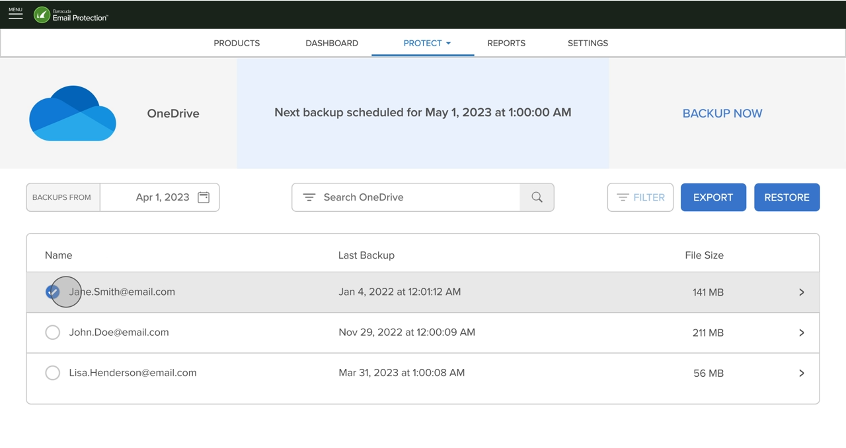
- Unlimited Cloud-to-Cloud Backup automatically captures daily snapshots of Exchange Online mailboxes, Teams, SharePoint, OneDrive, Groups, OneNote and Entra ID data with no storage limits or extra GB fees
- Data transfers via 128-bit SSL encryption and rests with 256-bit AES in SSAE Type II-certified cloud storage across multiple geolocations
- Supports customizable schedules, on-demand backups, role-based access, and alerts for monitoring, ensuring scalability for MSPs or growing enterprises without hardware
Point-In-Time Recovery
- Restore entire mailboxes, folders, calendars, contacts, or individual items to any daily backup revision directly to Outlook, PST, or original locations via a self-service web portal.
- Cross-user recovery allows admins to restore data to different accounts, while file-revision recovery pulls specific versions, bypassing MS365’s 93-day recycle bin limits.
- Granular item-level search and audit logs provide visibility into restores, supporting rapid recovery for ransomware, accidental deletions, or admin errors in minutes
File Scanning for PII and Malware (Data Inspector)
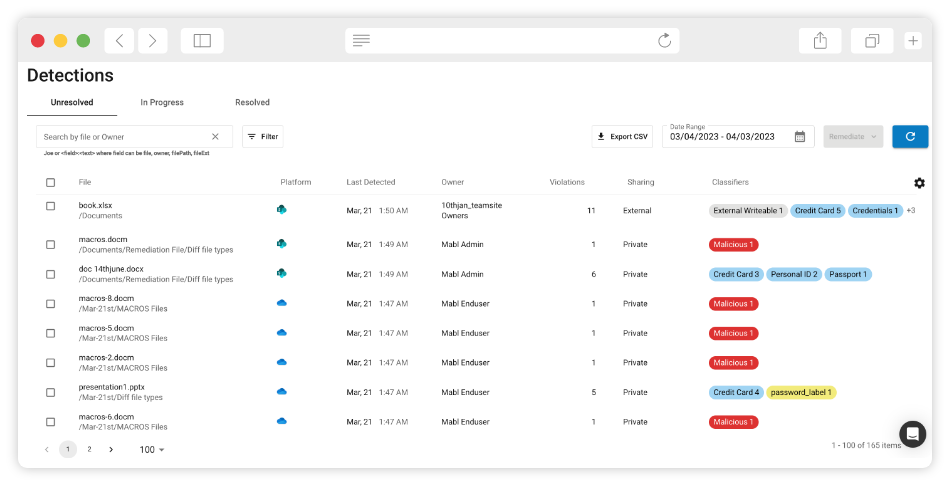
- Data Inspector continuously scans OneDrive and SharePoint files for sensitive PII (credit cards, SSNs, health data) using customizable dictionaries and malware signatures.
- Identifies risky content with sharing visibility – who has access, external shares – and flags potential leaks, or dormant threats missed by MS365 native tools.
- Integrates with Advanced threat protection for proactive quarantine, reducing compliance risks under GDPR, HIPAA or NIS2 without manual reviews
Remediation of improper file shares
- Automated workflows detect and fix over-exposed shares (e.g. public links, unauthorized externals), revoking access or notifying owners directly from the console.
- Bulk remediation across tenants/users handles widespread misconfigurations post-incident, with reporting to track fixes and prevent recurrence
- Combines with DLP policies for outbound email scanning, creating a unified layer that enforces least-privilege sharing across M365 collaboration tools
Premium Plus Plan

The Premium Plus Plan includes everyting of the Premium plan, plus the features listed below:
Cloud Archiving
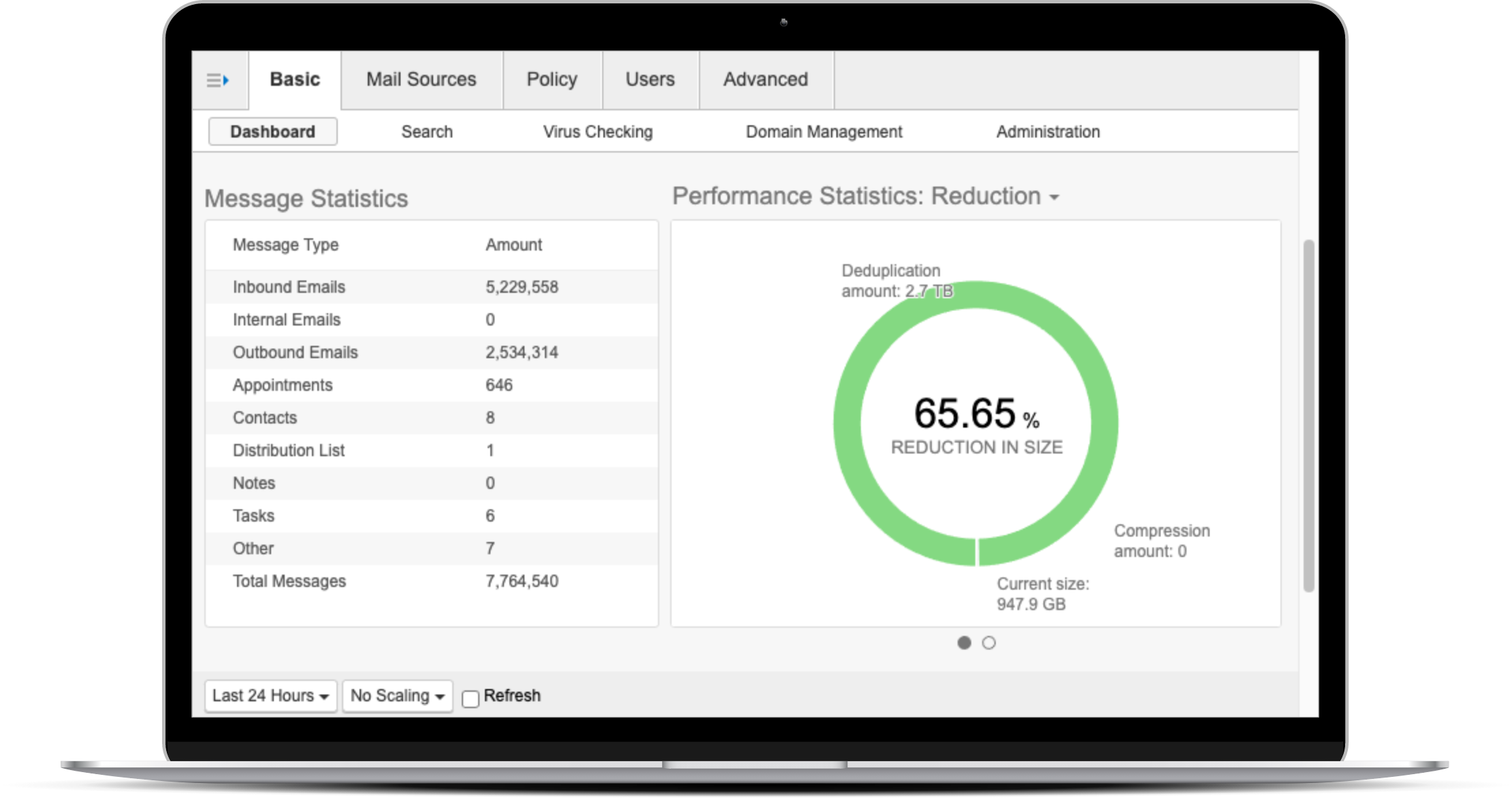
- Unlimited cloud archiving captures and indexes all inbound/outbound/reply emails in an immutable, searchable repository with no storage caps or retention time limits.
- Supports policy-based retention, legal holds, and eDiscovery searches across custodians, keywords, dates, or attachments, exporting in native PST/EML for compliance (GDPR, HIPAA, NIS2)
- Integrates with Email Protection for unified threat journaling, rapid legal reviews, and audit-proof chain-of-custody without relying on MS365’s limited holds
Security Awareness Training
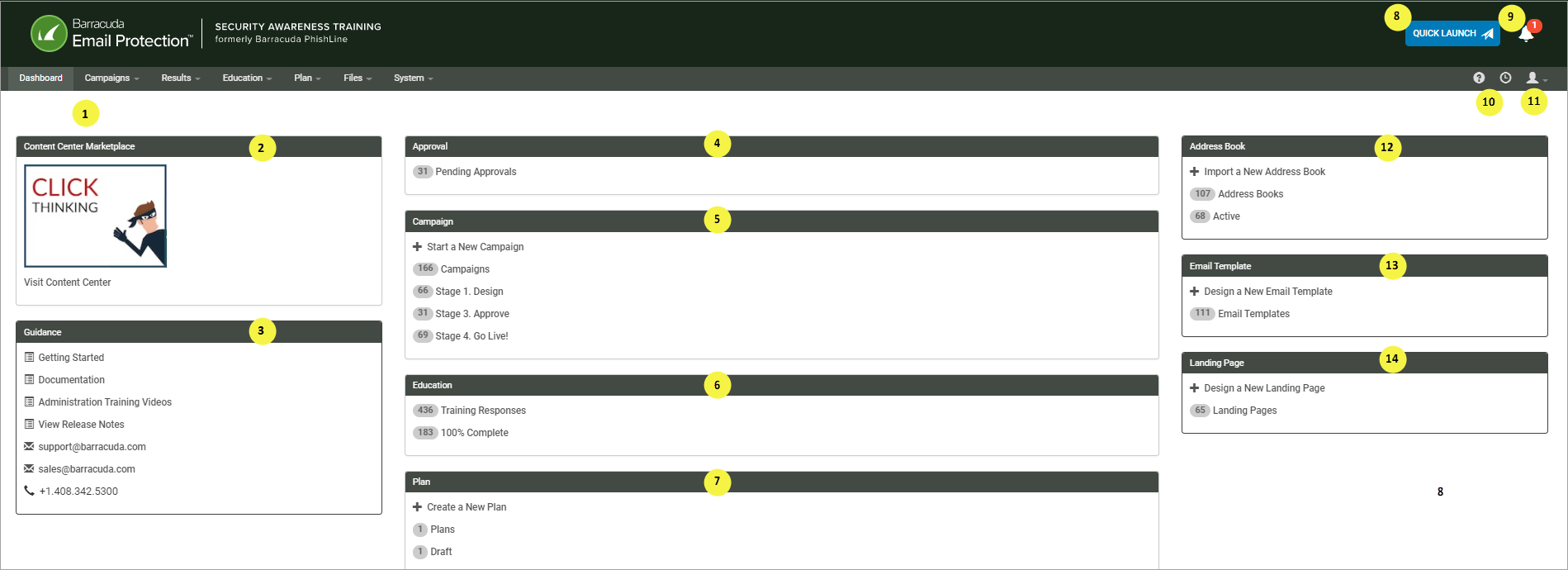
- Personalized, automated training platform delivers bite-sized modules on phishing recognition, password hygiene, ransomware avoidance, and safe link practices via email or portal
- Tracks completion rates, quiz scores, and risk scores per user/group, auto-assigning content based on threat interactions (e.g. phish clicks trigger remedial training)
- Multi-language support and customizable branding make rollout seamless for global teams or MSP clients, reducing human-error incidents by up to 90% over time
Attack Simulation
- Real-world phishing, BEC, QR-code, and vishing simulations test employee responses with dynamically generated campaigns mimicking live threats
- Measures click rates, reporting behavior, and susceptibility, generating heatmaps and benchmarks against industry peers for targeted improvement plans
- Auto-remediation simulation interactions (e.g. quarantine fake malware) and feeds results into training loops or SIEM, building organizational resilience without real risk.
- Microsoft's retention policies are rigid and deletion-focused, lacking true backups. Microsoft itself recommends third-party solutions like Barracuda for ransomware recovery, accidental deletes and outages.
- CCB is really easy. You set it up in 5 minutes, while benefiting end-to-end encryption, MFA, RBAC and redundancy across copies, cutting downtime from days to minutes without on-prem hardware
- Data Inspector auto-scans OneDrive/SharePoint (where Copilot pulls generative AI content) for PII, sensitive data, and dormant malware, alerting on new risks with redacted previews and automated remediation
- Customers using CoPilot need Data Inspector! It prevents AI hallucinations or leaks from poisoned data (e.g. flags improper shares before Copilot queries them); monitors access patterns; provides audit logs for compliance