JumpCloud Passwordless Authentication
Identity Passwordless AccessOverview

JumpCloud's passwordless capabilities center on JumpCloud Go (device-bound, biometric-based login) and WebAuthn/FIDO2 security keys for phishing-resistant access to web apps and the user portal. Together they are positioned as a way for SMEs and MSPs to consolidate identity, SSO, MFA and passwordless into one open directory platform, reducing credential risk and user friction
- JumpCloud Go issues a hardware-protected, device-bound credential on a managed and trusted endpoint (Windows/macOS), and then uses OS biometrics (Windows Hello, Touch ID) as the primary factor for subsequent web logins
- WebAuthn/FIDO2 support allows registration and use of external security keys or built-in platform authenticators as MFA or passwordless factors for the JumpCloud user portal and SSO applications
- Both are anchored in the JumpCloud Directory Platform, so policies (MFA, conditional access, device trust, groups) apply consistently across SSO apps, VPNs, servers and other managed resources
How to position
- Small and medium enterprises that are searching for an IAM solution in combination with MDM in one platform and want to have heterogeneous fleets (Windows/macOS, cloud apps, some legacy AD) bundled with the strenght of passwordless access
- MSPs wanting a standardized, multi-tenant way to deliver passwordless and MFA to a broad SMB base with limited security staff
- Resellers that want to reduce credential-based attack surface (phishing, password reuse, MFA fatigue) with phishing-resistant factors and device binding
- Improve user experience versus classic MFA by replacing repeated OTP/push prompts with "tap Touch ID/Hello once, then SSO everywhere"
One-Platform play
- Manage all your identities in one place: No matter where your current or future identities live, manage them all in one platform
- Helpdesk works in one place: Whether it is onboarding a new user, changing access, or staging a new laptop/mobile phone you do it in one place.
- Lift your security: Enforce the use of FIDO2 using conditional access policies. Users need to onboard their FIDO2 token otherwise they don't have any access
- Get compliant! JumpCloud helps you in your compliancy journey. Asset management, user management and identity security in one easy-to-use platform.
Questions to ask
- Do you have a lot of work resetting passwords? Does this have a high impact on your internal helpdesk?
- Do you want to use passwordless access without the need of hardware tokens by leveraging Windows Hello/Apple TouchID?
- Do you rely heavily on Google Workspace, Google Cloud or Amazon WorkSpaces? JumpCloud Go has already documented integrations for passwordless access
Core Features
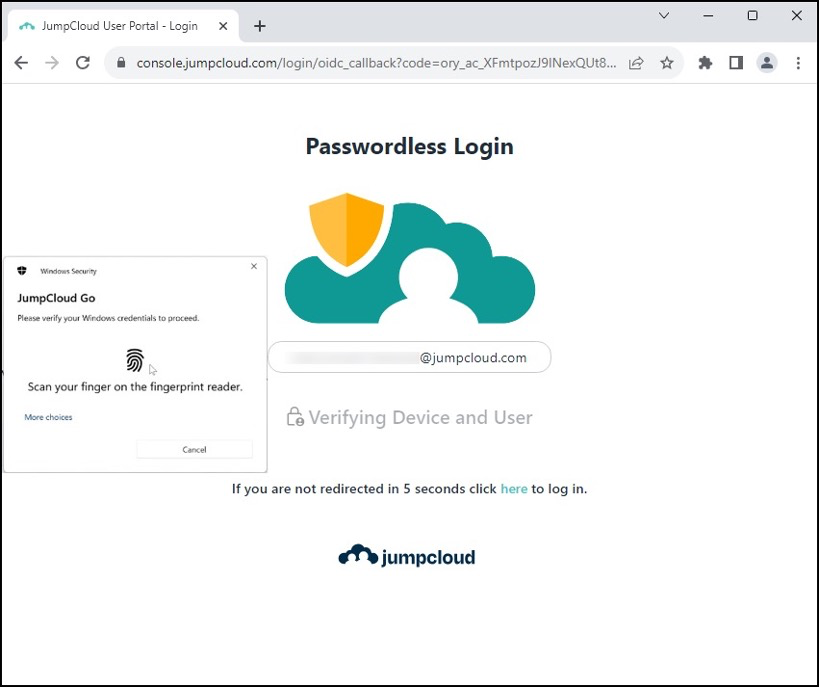
- Passwordless login from trusted devices: once a user authenticates via Go on a managed device, subsequent logins to JumpCloud-protected web resources become passwordless, driven by device-bound keys and biometric prompts
- Phishing-resistant, hardware-backed authentication: credentials are stored in secure hardware on the endpoint or security key, and all login requests are cryptographically verified to prevent credential theft and MFA bypass
- High MFA assurance: Go combines something you know, something you have, and something you are (biometric) into up to three factors in a single, streamlined flow
Feature Overview
| Aspect | JumpCloud Go | WebAuthn / FIDO2 in JumpCloud |
|---|---|---|
| Factor type | Device-bound, OS biometric-backed authenticator | External or platform FIDO2/Webauthn keys (USB, NFC, built-in biometric) like Onespan FIDO2 tokens |
| Primary use | Passwordless access from managed/trusted devices to JumpCloud-protected web resources and cloud workspaces | MFA or passwordless into JumpCloud user portal and SSO apps |
| Platforms | Windows, macOS and Linux endpoints | Any Webauthn-capable browser/platform supported by JumpCloud portal and apps |
| Device Management | Works with JumpCloud MDM or third-party MDM/EMM, using device trust as policy input | Independent of MDM; relies on key possession and Webauthn registration |
| Security posture | Hardware-protected, phishing-resistant, multi-factor in a single gesture. | Hardware-protected, phishing-resistant MFA or passwordless, flexible across devices |